

Every project-based company reaches a point where managing people and projects stops being simple.
As your company grows, you need answers:
- Who’s available?
- Who has the right skills?
- Who worked on similar projects before?
- How much capacity does your team actually have?
- Are your projects actually profitable?
The answers exist. They’re just scattered across spreadsheets, HR software, CRMs, and time-tracking tools.
So you start looking for a platform that brings everything together.
Every off-the-shelf solution solves part of the problem, but none of them fits the way your business actually works. Most companies choose the closest fit and adapt their processes around it.
After several attempts with external platforms, we decided to take a different path. Instead of forcing our workflow into someone else’s software, we started building our own staffing platform.
Was it worth it? Here’s what we learned.
Custom vs. Off-the-Shelf Software: Why We Built Our Own Platform
As already mentioned, building custom software wasn’t our first choice.
Like most companies, we started by looking at existing platforms. Buying an off-the-shelf solution is usually the fastest and most cost-effective option. The problem we found after several tests was the actual adoption rate, ease of use, and readability for our specific use cases. We didn’t find any platform that fit how we worked, with our level of granularity, type of customers, etc. At the end of the day, once we weighed the costs against the value and considered the risks of scaling the app as we grew, we found ourselves back to square one. The more we evaluated available tools, the more limitations we uncovered.
- Cost: Most platforms charge per user. That works well when your team is small. As the company grows, subscription costs grow with it. At some point, the pricing no longer makes sense.
- Fit: Every company has its own way of managing people, projects, and capacity. Off-the-shelf platforms have to work for thousands of businesses, so they naturally optimize for common use cases. As we dug deeper, it became clear we’d have to change the way we worked just to fit the software.
- Integration: Most platforms integrated well with popular tools, but our workflow depended on a mix of commercial and internal systems. We’d still need custom integrations to connect everything, adding complexity rather than simplifying how we manage people and projects.
- Data ownership: With a third-party SaaS product, sensitive business data is typically stored by the software vendor. Building our own platform meant it stayed under our control.
We realized we’d spend more time adapting to the software than building something small of our own and then expanding it according to our needs. And with AI now part of the process, that’s a faster path than it used to be.
What We Built Into Our Staffing Platform
We didn’t try to build a complete staffing platform from day one. Instead, we focused on solving our biggest day-to-day challenges first.
The platform is still evolving, but even in its current state it brings together the information needed to plan work, understand team capacity, and make staffing decisions more efficiently.
Resource Planning
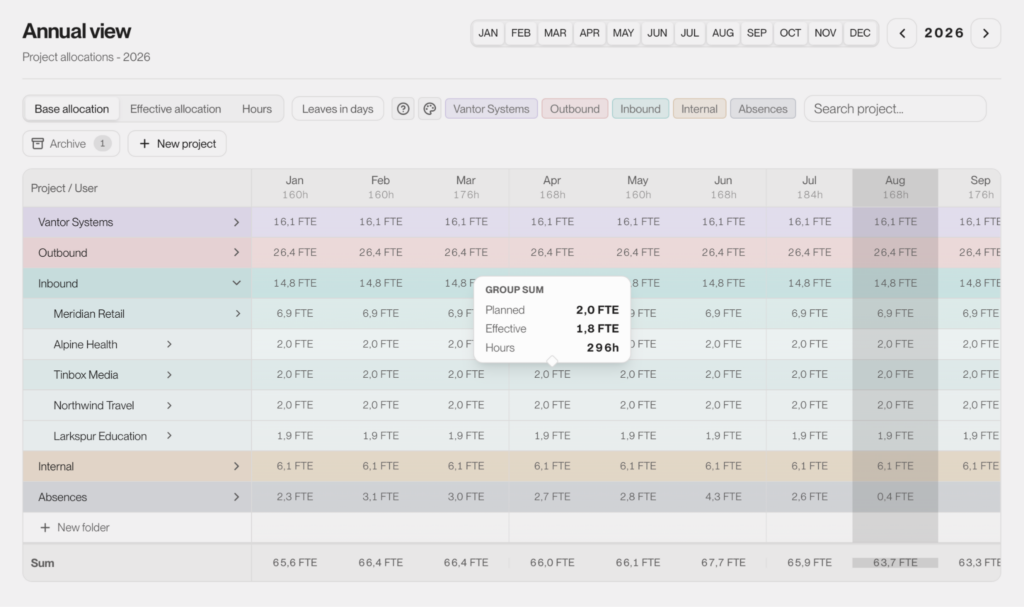
Our project sizes vary from small, a couple of hours jobs, to long-lasting several years commitments. Because of the specifics of the projects, we often have people working across multiple projects in the same week. On top of that, priorities change, new requests appear, and project timelines shift. We needed a way to understand how those changes affected capacity for other projects and future assignments without manually updating several spreadsheets or checking with multiple project managers.
That’s why we built a centralized planning board. We can view it by project or by person, and switch between weekly, monthly, and yearly views depending on what we need to see. Managers can quickly see current allocations, upcoming capacity, and make staffing decisions based on the latest information.
Skills & Availability
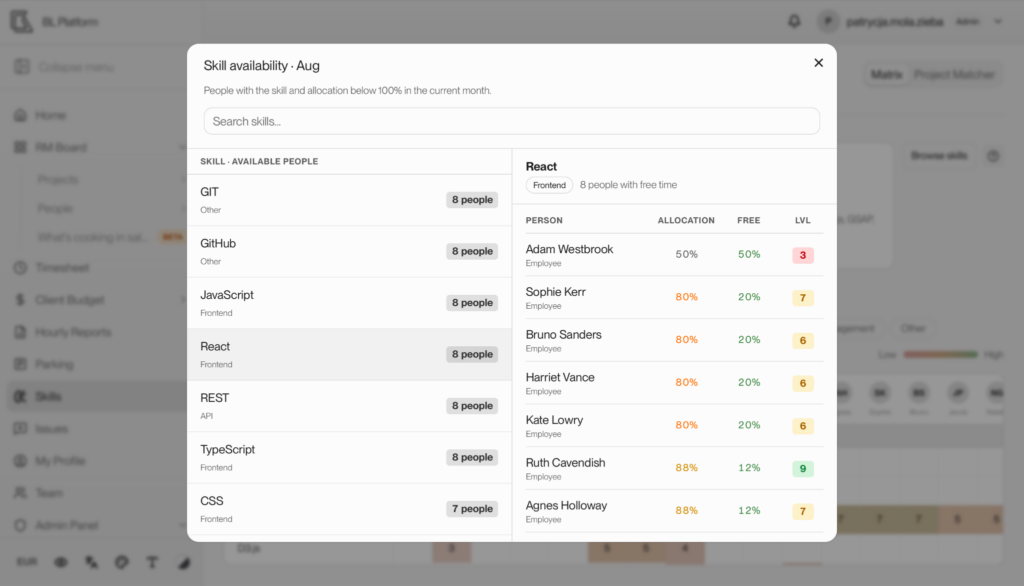
To manage projects well, we need to quickly check not only who’s available, but also who’s qualified for the specific job.
Our platform combines skills and availability into searchable profiles. It makes it easier to identify the best people for upcoming projects instead of relying on memory or spreadsheets. What’s important is that every developer can update their skills independently, and their leaders can check and correct any mistakes to keep this data as up-to-date as possible.
Self-Reporting & Historical Data
Planning only works when the underlying data stays up to date.
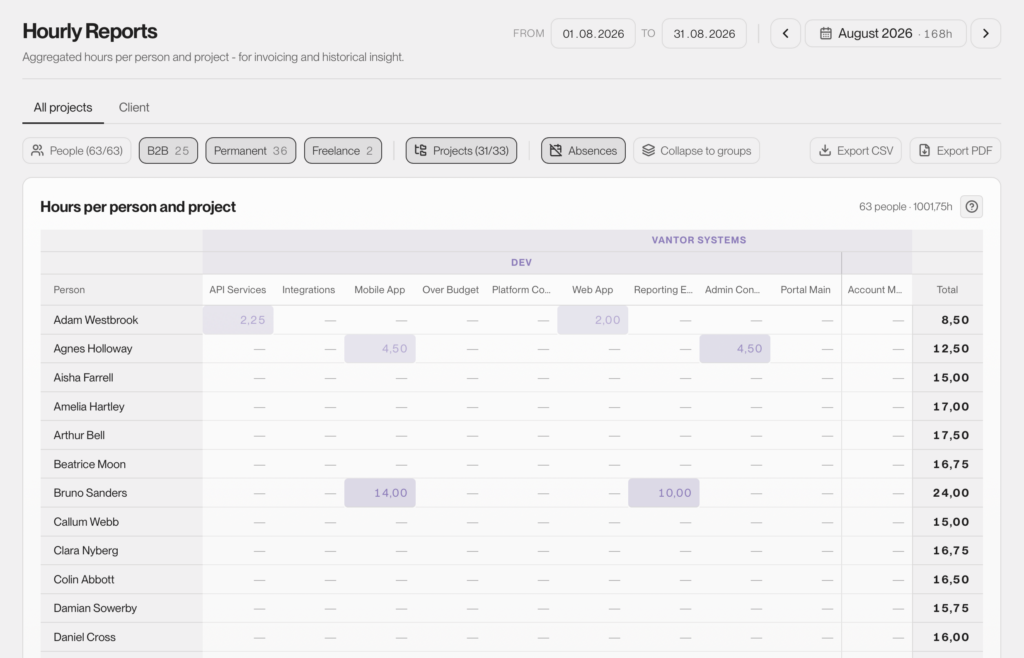
Managers set the plan: how many hours a person should spend on a project. Team members can see that plan and log their own hours against it. They track their own pace against what was expected on a daily basis, instead of waiting to be told they’re behind.
That log becomes a record. Managers get reports on actual vs planned hours worked, which makes it easier to spot patterns, review past decisions, and staff future projects based on what actually happened, not just what was scheduled.
Custom Modules
Not every requirement belongs in the core platform.
Some capabilities were built to solve a specific business or organizational need rather than become part of the standard workflow. One example is a dedicated budgeting module. It allows the whole team to see budget progress and usage, while configuration and actual rates stay visible only to administrators.
Other times, it’s just office life that needs organizing. In our case, that was office parking, where we can see which spots are reserved, and by whom.
None of these needed a separate tool. They’re all part of the same platform, alongside everything else we’ve described here.
Configuration Instead of Hard-Coding
We wanted the platform to evolve alongside our business, so we planned to build it to scale, add new functionality, and easily configure the current one.
Settings like categories, terminology, and access permissions are configurable. This allows the platform to adapt as our processes change, without requiring a new release for every small adjustment.
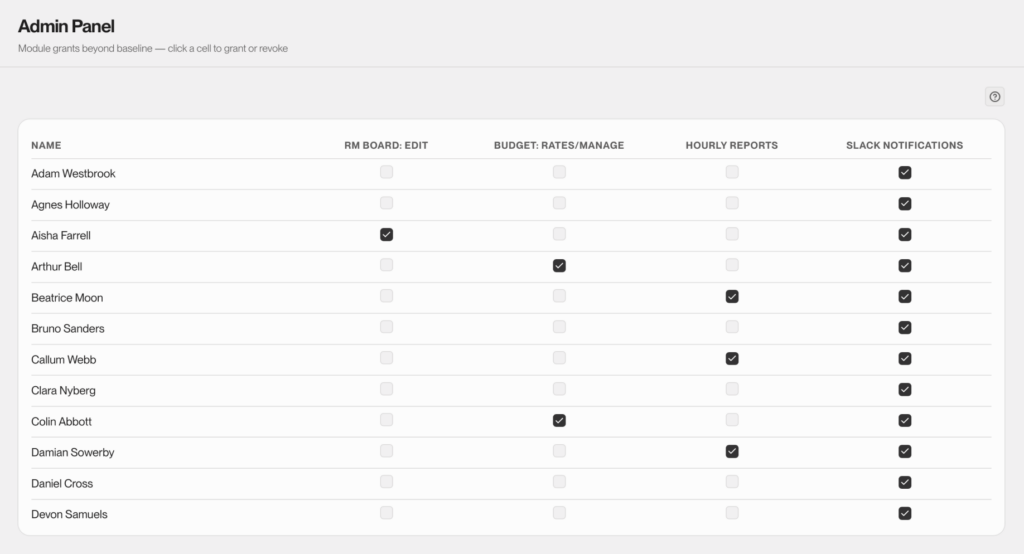
Notifications work the same way. We can decide who gets updates through Slack, and how often, instead of shipping one fixed set of alerts everyone has to live with. And if we decide to change the communication platform at some point, it will be just a two-liner change to make it happen.
That’s the advantage of owning the whole thing end to end. If we want to add something tomorrow (like company events, client visit tracking, project-retrospective summary, or whatever comes up), it’s usually 1-2 weeks away, not a feature request sitting in someone else’s backlog. This is important especially for small and medium-sized companies. Most of-the-shelf platforms are designed for the highest-paying customers with thousands of employees, prioritizing revenue over the value new features could bring to smaller businesses.
Access Control & Data Security
Our platform stores sensitive business information, including salaries, hourly rates, timesheets, and personal data. Protecting that information was a core requirement from day one.
To support that, we designed several layers of security:
- Authentication. Team members sign in using their company Google account, with two-factor authentication providing an additional layer of security. Only accounts explicitly approved by an administrator can access the platform. Permissions can be revoked immediately without affecting any historical data.
- Granular permissions. Access is enforced on the server, not just in the interface. For example, someone without budget permissions can never access hourly rates.
- Audit logging. Administrative actions, such as granting access or changing roles, are recorded in an audit log.
- Environment isolation. Production data remains isolated from development, testing, and demo environments, which use generated data instead of real business information.
Building Software with AI: Where It Helped, Where It Didn’t
AI is good enough now to meaningfully speed up development. We used it where that was true. We relied on our own judgment where it wasn’t.
Where AI Helped
AI handled the repetitive, predictable parts of development: boilerplate code, CRUD operations, and early UI iterations. In other words, the scaffolding every application needs before the real complexity begins.
Thanks to that, the PoC was ready in the first month, and the entire platform — from the prototype to its current state — was built in just a few months.
To sum it up, AI made the experimentation phase much faster. We could test an idea, validate it, and discard it if it wasn’t the right direction.
Where Engineering Judgment Made the Difference
As the platform evolved, making the right decisions became more complex, and simply writing code was no longer enough. The real challenges included:
- Business rules: Resource planning quickly became a collection of business rules, exceptions, and edge cases. AI could help implement a rule once we knew what it should be. But deciding things like: “What counts as overallocation”, “How an exception should be handled“, “What company rules to keep and what to change or completely delete”, took human judgment. The model also couldn’t predict how a change in one place would affect the rest of the system, with all integrations in place. That required understanding not only the code, but the business rules behind it.
- Data model & architecture: Every project, person, skill, and assignment had to fit into a consistent data model. Even a small change, such as introducing a new way to filter people by skill, could affect assignments, availability, and reporting throughout the platform. The same was true for the overall architecture. Early decisions had to support future growth without making the system harder to maintain.
- Code review: We treated AI-generated code the same way we’d treat code from a junior developer: useful, often fast, but never accepted without review. AI could propose changes, but it was never allowed to commit code, deploy changes, or access production data. Every implementation was reviewed before it shipped.
- Integrations: Connecting the platform with the tools we already relied on wasn’t a matter of writing the right prompt. It required understanding how each system behaved, handling edge cases, and manually validating that everything worked reliably under real conditions.
We didn’t treat AI as a replacement for engineering, but rather as another tool in the development process. It made us faster, but it didn’t change who was responsible for the final product’s quality.
Lessons Learned from Building a Custom Software Platform
Configurability costs more upfront, but pays off later.
Early on, it was tempting to build only for the requirements we had at the time. Later, new skills, assignment rules, and reporting needs meant some of those decisions had to be revisited. Building for flexibility from the start takes more effort, but it usually pays for itself as the product evolves.
Integrations are almost always underestimated.
Connecting systems wasn’t the difficult part. Handling edge cases, inconsistent data, and unexpected API changes was. They deserve more time in the plan than they seem to need.
Building everything at once slows you down.
Building everything at once is tempting, especially when you already know where the product is heading. In our experience, shipping a working version early and expanding it step by step made it easier to validate ideas and adjust as requirements changed.
A good data model makes everything else easier.
Almost every new feature depended on the same core entities: people, skills, projects, and assignments. Investing more time in designing those relationships early made extending the platform much easier later.
Security is a design decision, not a later phase.
Access rules affected almost every feature we built. Defining permissions early and enforcing them on the server rather than just in the interface was a small investment upfront that prevented much bigger changes later.
AI needs context, not just prompts.
As the project evolved, we found that AI performed best when it had context beyond the code itself. Keeping a small set of documents describing the architecture, previous decisions, and known pitfalls turned out to be more valuable than writing increasingly sophisticated prompts.
What Makes Custom Software Projects Successful
While this project was a staffing platform, the challenges weren’t unique to staffing. We encounter the same questions whenever we’re building software that needs to support complex business processes, data, and workflows.
Looking back, this project reinforced something we see across many engagements: successful software isn’t defined by the technology stack or the generic features it includes. It starts with a clear understanding of the problem and designing the solution for the specific use case. This means looking beyond today’s requirements and making technical decisions that allow the product to evolve as the business grows.
Let’s return to the question we started with: was it worth it?
For the first time in 15 years, we’ve moved away from hourly and allocation spreadsheets, without disrupting anything else about how we work. That alone made the decision worth it. But whether it’s the right call for you depends on a few things:
- How different are your processes from what most off-the-shelf tools are designed to support?
- How much of the data you need already lives in other systems that a new platform would need to integrate with?
- Do you have the time, resources, and engineering discipline to build something that will continue to deliver value as your business grows?
Off-the-shelf software can be the right choice when it fits your processes and gives you what you need without unnecessary complexity. But when your business depends on unique workflows, connected data, or capabilities that standard tools can’t provide, custom software often delivers greater long-term value.
If you want to build a custom staffing platform but don’t have the resources or experience in-house, it helps to work with a team that does. At Black Label, we built this for ourselves, so we know where the real challenges are and how to solve them quickly. That includes everything from designing flexible business workflows to building secure platforms where sensitive business data stays under the client’s control.
Explore our case studies to see how we’ve helped clients build custom software.